
Extensions built to order
Custom Browser Extension Development: A Small Program That Does One Job Where Your Users Already Work
Count the tabs open on your sales lead's laptop right now. An extension puts the one tool they keep switching to inside the page they are already reading. This section explains how we build one, what it costs, and when to build something else.
November 16, 2026 · 11 min read

The short answer
Custom browser extension development means building a small program, mostly in HTML, CSS and JavaScript, that adds one feature to Chrome and other browsers: your app's data on Google, one-click capture into a CRM, an AI sidebar or a staff tool. DataCram builds them on Manifest V3 from $1,500, depending on complexity, with a fixed written estimate and the listing under your own developer account.
On this page
- Six tabs, one spreadsheet, and the copy-and-paste nobody budgeted for
- The jobs a browser extension does better than another tab
- GatorCrawl Keywords: the extension we built for our own product
- Four build rules we do not bend
- The install prompt is a sales page, and most read like a ransom note
- Build nothing: the cheaper answers we suggest first
- The rest of this section, matched to the worry that brought you here
- One price floor, one written estimate, and your name on the listing
Six tabs, one spreadsheet, and the copy-and-paste nobody budgeted for
Watch a sales rep work for ten minutes. She reads a prospect's website in one tab and opens the CRM in a second. She copies a phone number, switches back for the company name, and loses the thread when a third tab pings. Nothing is broken. Every tool does its job. The job that falls between them, carrying a fact from the page into the system, is done by hand, dozens of times a day, by people paid to sell.
Google's Chrome extension documentation, read in November 2026, says extensions "enhance the browsing experience by customizing the user interface, observing browser events, and modifying the web." They are written in the same HTML, CSS and JavaScript as a web page, plus a set of browser APIs an ordinary page never gets. In plain terms, an extension is a small program that lives in the browser and can see the page the user is on. That second part is the whole point, and the whole risk.
Built well, an extension does one narrow job, asks for as little access as it can, keeps the business logic on your server, and belongs to you. Built badly, it is the toolbar from 2009 with a new icon. This section is about the first kind, and about the many cases where the honest answer is to build nothing at all.
An extension should do one job on the page your user is already reading, and ask for nothing more.
The jobs a browser extension does better than another tab
Most useful business extensions fall into a handful of families. Each has its own page in this section with the mechanics, the store rules that apply and the questions to ask before paying anyone, us included.
Your web app, inside the page
A SaaS companion extension signs in with the same account and spends the same credits as the app, so users never leave the site they are working on.
Your numbers on someone else's page
SEO extensions draw your data beside Google results. Ecommerce extensions do the same for store owners checking orders and their own catalog.
One click into the CRM
CRM extensions and sales prospecting extensions send a contact to your system through its API. Recruiting extensions do it for an ATS.
An AI sidebar on your own account
AI assistant extensions summarize, draft and extract through your own AI provider, with the key held on a server rather than shipped inside the extension.
Tools only your staff can install
Internal team extensions are published privately and can be force-installed by an administrator. Customer support extensions put customer context beside the inbox.
Capture built for one trade
Real estate extensions save listings and contacts to the agent's CRM. For more starting points, read our extension ideas for business.
Chrome's documentation names the parts all of these are made from: a manifest, a service worker, content scripts, a toolbar action and a side panel, among others. The side panel API, which Chrome lists as available from Chrome 114, can stay open as the user moves between tabs if the extension is set to do so. That one feature is why many AI sidebars and support tools now live in the browser rather than in yet another tab.
GatorCrawl Keywords: the extension we built for our own product
DataCram built GatorCrawl Keywords, a keyword research web app, and then its Chrome extension. The extension has one job, and the product's site describes it in one line: "Volume, difficulty, CPC, intent and the 12-month trend appear under the Google search box, with related searches and “People also ask” filled in." As of November 2026 the same page says the extension is "Included with every plan."
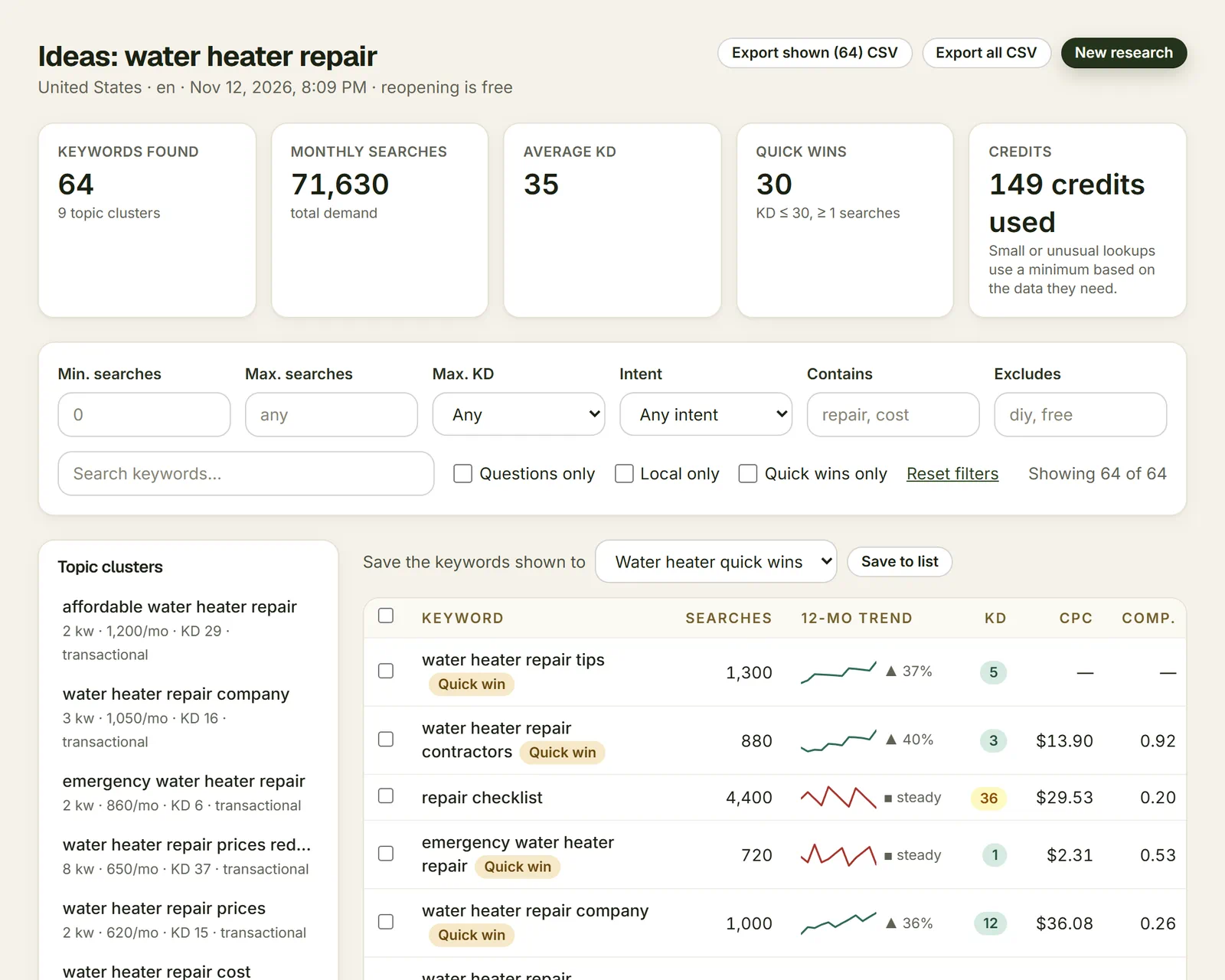
Look at what it asks for. The manifest, read from our own source code in November 2026, requests two permissions, storage and contextMenus, plus host access to the app's own address. Its content script runs on one address pattern, Google's search results pages, and nowhere else. Chrome's permissions list shows no warning line for either permission. There is no request to read every site, no tabs permission, no browsing history.
The thinking happens on the server. The extension holds a token, sends the words from a results page to the app's API in one batch, and keeps the answers for an hour so a reload does not spend credits twice. The site defines one credit as one keyword with data. As of November 2026, plans list at $19, $49 and $129 a month, and each starts with a seven-day trial for $5. Our GatorCrawl build story walks through every file, and our keyword research tools guide shows where tools like it fit.
Four build rules we do not bend
Every extension we write follows the same four rules. Each one comes from the browser makers' own documentation, not from taste.
- Manifest V3 only. Chrome calls it "the latest version of the extensions platform," and its Manifest V2 timeline records that Chrome 138 disabled Manifest V2 for every user in July 2025. Our Manifest V3 guide covers what changed.
- The narrowest permissions that do the job. The Chrome Web Store's permissions policy says to "Request access to the narrowest permissions necessary" and not to "future proof" a product with extras. Read extension permissions and privacy for the detail.
- Code in the package, logic on your server. Manifest V3 removed remotely hosted code, so an extension runs only the JavaScript it ships with. The store's Manifest V3 requirements still allow syncing account data with a remote server, which is where pricing rules, AI calls and CRM writes belong.
- Published under your developer account. Chrome Web Store registration carries a one-time fee, $5 as of November 2026 according to an April 30, 2026 entry on Chrome's What's new page, and 2-Step Verification is required before publishing. The account is yours. We work inside it.
Chrome is the start, not the end. Microsoft's Edge extension docs say Chromium browsers share the same extension APIs and that an existing extension can be submitted without a rewrite. Firefox and Safari take more work: MDN says Firefox does not support the Manifest V3 service worker background, and Apple wraps Safari extensions in an app built with its xcrun safari-web-extension-packager tool. Our pages on cross-browser extensions, Firefox add-ons and Safari web extensions cover each difference.
The install prompt is a sales page, and most read like a ransom note
Somewhere tonight an extension that changes the font on a recipe site is asking to "Read and change all your data on all websites." Chrome's permissions list shows that exact warning for several permissions, and users have learned to click through it the way they click through cookie banners. The careful ones stop installing. Every permission you request is a line on the screen where a stranger decides whether to trust you.
The risks are documented. Cyberhaven wrote in its own incident post, dated December 27, 2024, that a phishing attack compromised an employee's access to the Chrome Web Store and that the attacker used it to publish a malicious version of the company's extension. Earlier, in a June 2020 GitHub post, the original developer of The Great Suspender announced a new owner who had "purchased the rights to publish the extension." Its store listing was gone by early February 2021, according to an Internet Archive capture of the page dated February 6, 2021. A developer account is a master key to every installed copy.
Build nothing: the cheaper answers we suggest first
The fastest way to waste $1,500 is to commission an extension for a job something else already does. We say so on the first call, and we put it here so you can skip the call.
| If the job is | Our usual advice | Why |
|---|---|---|
| Checking titles, redirects or keyword volumes with standard tools | Install an existing extension | Our guide to SEO Chrome extensions lists the ones still maintained |
| A one-off action on a page, used by one person now and then | A bookmarklet | A saved link that runs a script needs no store, no review and no install prompt |
| A tool people open on purpose, which never needs to see another site | A web app | Extension or web app walks through the choice, and web app development builds it |
| A feature on your own WordPress site | A plugin | Custom WordPress plugins are the same idea inside WordPress |
| Moving data between two systems with no person in the loop | An automation | Workflow automation runs on a server and needs no browser |
| Collecting data from a site whose terms forbid automated collection | Do not build it | Read the site's terms first; no code turns a forbidden use into an allowed one |
If none of those fits, and the job happens on a web page, in front of a person, many times a day, an extension is usually the right tool. When it is one piece of a larger product plan, a conversation with a fractional CTO can settle the order of work before anyone writes code.
The rest of this section, matched to the worry that brought you here
| If you are wondering | Start with | Then read |
|---|---|---|
| What does a build include? | Custom Chrome extension development | What an extension costs |
| When could it be live? | How long a build takes | Chrome Web Store review |
| Will the store reject it? | Chrome Web Store review | Permissions and privacy |
| Does our old extension still work? | Manifest V3 | Extension maintenance |
| Do we need Firefox, Safari and Edge? | Cross-browser extensions | Firefox and Safari |
| Can we charge for it? | Monetizing an extension | SaaS companion extensions |
| Is it safe to install at work? | Extension security | Internal team extensions |
| What would one do for our trade? | Ideas for business | Real estate, recruiting and support |
| How is a real one put together? | The GatorCrawl case study | SEO extensions |
One price floor, one written estimate, and your name on the listing
DataCram builds custom browser extensions from $1,500, depending on complexity, with a fixed written estimate before work starts. The build includes the permission plan, store submission and the privacy disclosures the store requires. Connections to your own systems, whether a CRM, your web app, an AI model or a payment processor, go live the same day. Updates and maintenance after launch are quoted when you need them.
We recommend publishing under your company's own Chrome Web Store developer account, and the code is yours. If any developer, us included, wants to list your extension under their own account, ask what happens to your users on the day you part ways.
DataCram is a web studio in San Antonio, Texas that has built for the web since 1999 and works with businesses across the US by phone, video and a shared project page. Our published work shows the projects we can talk about. Products that grow out of an extension belong with custom software development, API integrations and AI agent development. Call (210) 346-0848, or describe the job in the form below.
Everything in Custom Browser Extensions
25 pages in this section.
More in Custom Browser Extensions
25- The offer, part by partCustom Chrome Extension Development Services: Discovery, a Permission Plan, the Build and a Listing in Your Name
- The price, line by lineHow Much Does It Cost to Build a Chrome Extension? Five Decisions, the Store Fees and Our Floor
- Case study, file by fileHow We Built the GatorCrawl Keywords Chrome Extension: Two Permissions, One Site and a Web App Behind It
- Your app, one tab closerSaaS Browser Extensions That Carry Your App's Login, Plan and Credits Into the Tab Your Users Already Have Open
- Your data, on their pageCustom SEO Chrome Extensions That Paint Your Own Numbers Onto Google's Results Page
- Capture, minus the clipboardCRM Chrome Extensions That Save a Contact in One Click, Straight Through Your CRM's API
- AI beside the pageAI Chrome Extensions That Summarize, Draft and Extract From the Side Panel, With Your API Keys Kept on Your Server
- Built for the back officePrivate Chrome Extensions for Your Staff, Installed by Policy and Never Listed for the Public
- The format Chrome keptManifest V3 Migration: What Changed, the Manifest V2 Shutdown Date by Date, and What It Means for an Older Extension
- One build, four browsersCross-Browser Extension Development: One Codebase for Chrome, Edge, Firefox and Safari, and the Four Places It Splits
- Mozilla's rules, read closelyFirefox Extension Development: Porting a Chrome Add-on, Getting It Signed by Mozilla, and the Manifest V2 Question
- An extension inside an appSafari Web Extension Development: Converting a Chrome Extension With Apple's Packager, Xcode and the App Store
- After the launchChrome Extension Maintenance: Updates, Policy Changes and the Permission Prompt That Switches Your Extension Off
- The store, read closelyChrome Web Store Review Process: Why Extensions Get Rejected and How to Stay Out of the Resubmission Loop
- Ask for lessChrome Extension Permissions Explained: The Warnings Users See, the Data Rules Behind Them, and a Privacy Policy That Matches the Code
- Getting paid, plainlyHow to Monetize a Chrome Extension Now That Google's Payments Are Gone: Accounts, Trials, Credits and the Ad Rules
- Pick the smaller toolBrowser Extension vs Web App: A Fair Decision Table, Including the Times a Bookmarklet Will Do
- Trust, then read the manifestAre Chrome Extensions Safe for Business? The Published Incidents, the Sold-Extension Problem and How a Build Limits Its Own Risk
- The calendar, honestlyHow Long Does It Take to Build a Chrome Extension? The Stages, Who Holds Each One, and Why Nobody Can Promise a Date
- Prospecting without the pasteSales Prospecting Chrome Extensions Built Around Your CRM, Not Around Copy and Paste
- Tools for the back officeEcommerce Chrome Extensions for Store Owners: Order Lookups, Product Data and Price Checks on Your Own Catalog
- For agents and brokeragesReal Estate Chrome Extensions That Save Listings and Contacts Straight to the Agent's CRM
- Sourcing, minus the retypingRecruiting Chrome Extensions That Send Candidates to Your ATS Without the Retyping
- Context at the reply boxCustomer Support Chrome Extensions: Customer Context Beside the Inbox and an AI Draft From Your Own Provider
- Ideas with a jobFifteen Browser Extension Ideas for Business, Starting With One That Already Ships
Questions owners ask about custom browser extensions
DataCram builds custom extensions from $1,500, depending on complexity, with a fixed written estimate before work starts. The number rises with the sites the extension touches, a backend, accounts and billing, extra browsers and store work. Google's one-time developer registration fee was $5 as of November 2026, per Chrome's What's new page. Our extension pricing guide explains each driver.
Nobody can promise that, and a developer who does is guessing. As of November 2026, Chrome's review page says "For most extensions, review is completed within a few days, but it can take up to a few weeks." Broad host permissions can slow it. We keep permissions narrow and fill in the disclosures carefully, which removes common rejection reasons, not the review itself.
You should. We recommend publishing under your company's own developer account, so the listing, the users and the update channel stay with you whoever maintains the code later. Google's registration page notes that a developer account's email address cannot be changed after the account is created, so register it with a company address you will keep.
Usually, with work for each. Microsoft says a Chromium extension can go to Edge without a rewrite. Firefox does not support the Manifest V3 service worker background, so the manifest lists both background forms, and Safari needs an Xcode project made with Apple's packager tool. Our cross-browser guide covers the differences.
They can be. An extension can read the pages it is allowed on, and a stolen developer account can push a bad update to every user, as Cyberhaven described in its December 2024 incident post. The defenses are narrow permissions, no remotely hosted code, and a developer account protected with two-factor authentication, ideally a security key.
Build the extension when the job happens on someone else's page, such as Google results, a prospect's site or a supplier's catalog, and people would otherwise copy data between tabs. Add it to the web app when people open the tool on purpose. Our extension or web app guide includes the cases where a bookmarklet is enough.
Keep reading
- The offer, part by partCustom Chrome Extension Development Services: Discovery, a Permission Plan, the Build and a Listing in Your NameHire a Chrome extension developer for discovery, a written permission plan, a Manifest V3 build, store submission and a handover under your account.
- Case study, file by fileHow We Built the GatorCrawl Keywords Chrome Extension: Two Permissions, One Site and a Web App Behind ItA Chrome extension case study, file by file: the manifest, the content script on Google, the service worker, the options page and the two permissions.
- The price, line by lineHow Much Does It Cost to Build a Chrome Extension? Five Decisions, the Store Fees and Our FloorWhat a custom Chrome extension costs to build: the five drivers, store fees as of November 2026, the costs after launch, and when not to spend at all.
- Your app, one tab closerSaaS Browser Extensions That Carry Your App's Login, Plan and Credits Into the Tab Your Users Already Have OpenA companion Chrome extension that signs in with your SaaS account, spends the same plan credits and bills on your own site. From $1,500, owned by you.
- Your data, on their pageCustom SEO Chrome Extensions That Paint Your Own Numbers Onto Google's Results PageBuild an SEO extension that shows your own keyword, rank or client data on Google results, on one site, with two permissions. From $1,500, yours to own.
- Capture, minus the clipboardCRM Chrome Extensions That Save a Contact in One Click, Straight Through Your CRM's APIA Chrome extension that saves the contact on your screen to your CRM in one click, through the CRM's API, with no copy and paste. From $1,500.
From the Insights desk
- Own the Building: Why a Custom Next.js Site Beats WordPress and WebflowWordPress and Webflow both rent you a website — you may decorate, you may not renovate. A custom Next.js build hands you the keys: complete customizability, a CMS shaped to your business instead of a builder's data model, and a site you actually own.
- Headless vs. Traditional CMS for E-Commerce: Which Shape Is Your Store?Headless separates the storefront from the commerce engine. That buys front-end freedom, potential speed and many sales channels — and moves search, SEO, checkout and maintenance onto your plate. Who should go headless, who should stay themed, and the middle path that is usually right.
Describe the job your team does between tabs
Tell us what happens on the page and where the data should go. A person at DataCram replies with an honest read: an existing extension, a web app feature, or a build from $1,500 with a fixed written estimate.
Which of these sounds like you? (pick any)
Rather talk now? Call (210) 346-0848.