
Your data, on their page
Custom SEO Chrome Extensions That Paint Your Own Numbers Onto Google's Results Page
The SEO toolbar market is crowded with extensions that show someone else's numbers. That is fine until the numbers you trust live in your own database, your agency's client files or the keyword tool you sell. Then the only extension that shows them is the one you have built.
November 16, 2026 · 9 min read
- PassClient recognized from the agency's account list
- FailTarget keyword in the title tagmissing
- PassCanonical follows the template pattern
- PassRequired LocalBusiness schema present
- WarnMeta description within house lengthtoo long
- WarnOpen tasks for this URL in the agency system2 open
The short answer
A custom SEO Chrome extension reads the search results or page in front of you and shows data from your own source beside it: keyword volumes, rank history, client notes or audit checks. Built well, it runs on the one site it needs and keeps the data and keys on your server. DataCram builds them from $1,500, depending on complexity, with a fixed written estimate.
On this page
- Install the free ones first, then build the one nobody sells
- Reading a results page without asking for the whole browser
- GatorCrawl Keywords on a search for water heater repair
- Four SEO overlays worth building for yourself
- Where the numbers come from, and who pays per lookup
- From the first match pattern to the store listing
- The SEO extension we would talk you out of
Install the free ones first, then build the one nobody sells
Start with the honest advice. If you want title tags, redirect chains or a rough search volume, the job is already done by an extension someone else maintains. Our article on SEO Chrome extensions compares the ones still worth installing, who owns each one now, and what each can read. Install from that list and keep your money.
A custom build earns its fee when the data is yours. An agency wants its client notes and target keywords to appear beside the client's listing on a results page. A keyword tool company wants its own numbers on Google, not a competitor's. An in-house team wants every page it visits checked against its own house rules rather than a generic score. No public extension can show data that only you hold.
That is the case for an SEO extension as a product feature rather than a utility. It works like the SaaS companion extensions we build: the extension is a window, and the data comes from a server you control. The browser extensions hub covers the other kinds.
Reading a results page without asking for the whole browser
The part that does the reading is a content script. Google's content scripts documentation, read in November 2026, says they "run in the context of web pages" and can "read details of the web pages the browser visits, make changes to them, and pass information to their parent extension." They run in what Google calls an isolated world, "a private execution environment that isn't accessible to the page or other extensions."
The question that separates a careful SEO extension from a careless one is where that script is allowed to run. Plenty of tools ask for every site, and Google's permissions list shows the warning some permissions carry: "Read and change all your data on all websites." That is a lot of trust to request in exchange for a keyword volume.
It also costs time at the store. Google's review process page, read in November 2026, says "Reviews may take longer for extensions that request broad host permissions," and names the patterns *://*/*, https://*/* and <all_urls>. A narrow extension is easier to trust, easier to review and easier to explain. Our page on extension permissions and privacy goes deeper on the warnings users see.
GatorCrawl Keywords on a search for water heater repair
DataCram's own GatorCrawl Keywords extension is the working example. Its content script matches one address pattern, https://www.google.com/search*, and runs at document_idle, after the page has settled. It asks for two permissions, storage and contextMenus, and one host: the GatorCrawl Keywords web app.
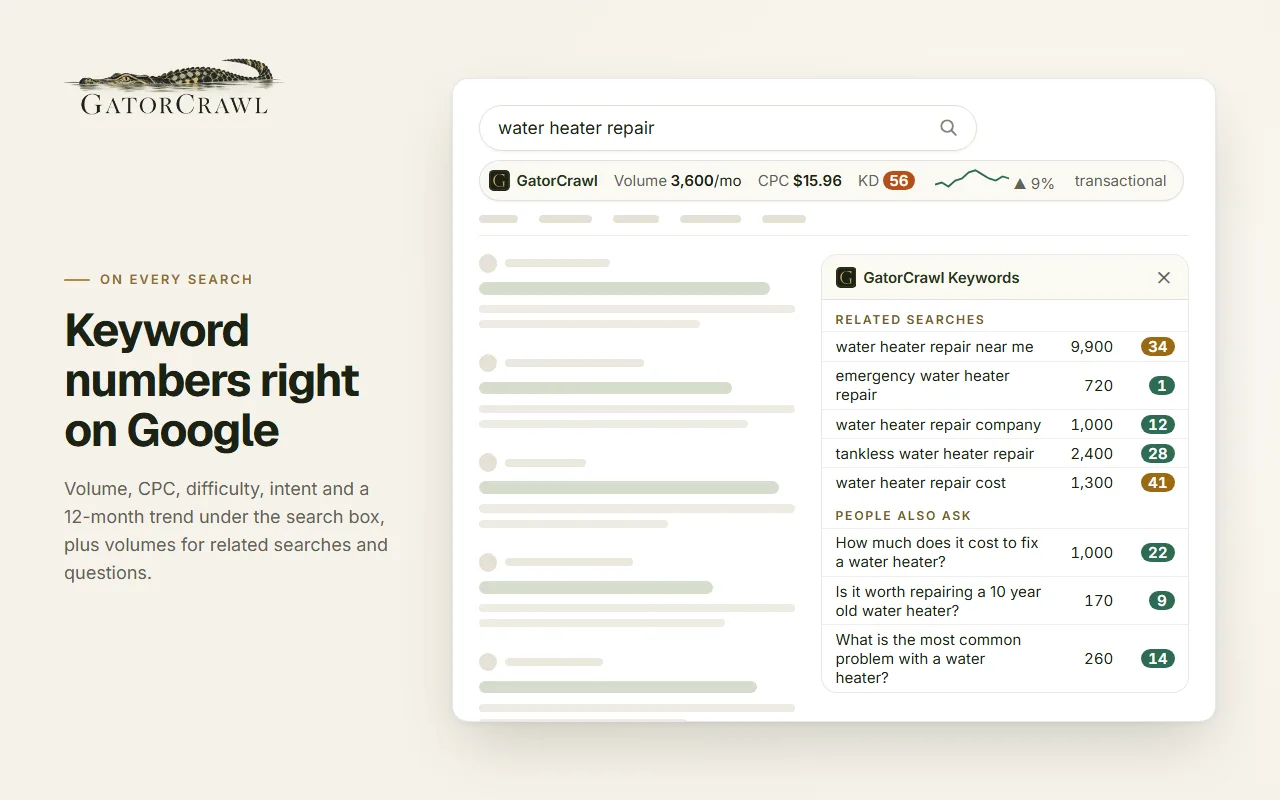
The GatorCrawl site describes the result this way: "Volume, difficulty, CPC, intent and the 12-month trend appear under the Google search box, with related searches and “People also ask” filled in. Select any text on any page and right-click to look it up. Included with every plan."
Underneath, the content script reads the query, the related searches and the People also ask questions, then sends them to the service worker as one batch. The service worker makes one call to the web app's API per results page and keeps the answers for an hour in session storage, so reloading the page does not spend credits again. The script's own comment explains how it stays out of Google's way: "Everything renders inside a shadow root so Google's styles and ours never mix." The right-click item, "Look up keyword volume," opens a lookup window that asks for "a phrase of up to 10 words." The GatorCrawl case study walks through every file.
Four SEO overlays worth building for yourself
Your keyword data on Google
A keyword or SEO tool company shows its own volumes, difficulty or intent labels on the results page, metered by the customer's plan, the way GatorCrawl does.
Client notes beside the client
An agency extension recognizes a client's domain in the results and shows the account's target keywords, last report date and open tasks from the agency's own system.
House rules on every page
An in-house checker reads the page you are on and tests it against your own standards: title length, a required schema type, the canonical pattern your templates should use.
One-click research capture
Select a phrase or a competitor's URL, right-click, and it lands in your research sheet or project tool through that tool's API, tagged with the query it came from.
Each one has a single job, which matters at the store. Google's quality guidelines, read in November 2026, say an extension "must have a single purpose that is narrow and easy to understand," and that clearly separate functions "should be put into two different extensions." An agency that wants all four builds two or three small tools, not one sprawling one.
Where the numbers come from, and who pays per lookup
The extension is the cheap part. The data behind it is the business. Before we quote, we ask where each number comes from and what each request costs, because an overlay that fires on every search can run up a data bill faster than anyone expects.
| Where it lives | How the extension reaches it | |
|---|---|---|
| Your own keyword or rank database | Your servers | Through your API, with the signed-in user's token |
| A licensed data provider | The provider, under your contract | Through your server, so the provider's key never ships in the extension; check the provider's terms for display |
| Client records in your agency system | Your CRM or project tool | Through that system's API from your server, matched by domain |
| The page itself | The tab the user is viewing | Read by the content script on the sites the permission plan names |
Two habits keep the bill sane. Batch the request, the way GatorCrawl sends a whole results page in one call. Cache the answer, the way GatorCrawl keeps results for an hour. Charging the user's plan for each lookup, instead of absorbing the cost, is a product decision that our monetization guide covers. For the research side, our keyword research service and the keyword research tools guide explain what those numbers mean.
From the first match pattern to the store listing
- 1
Name the pages
List every site and path the extension will read. GatorCrawl reads one. Each site added is another line to justify on the store's privacy tab.
- 2
Decide what appears, and where
A bar, a panel, a badge beside each result, or a right-click lookup. Each placement is tested against the real page layout, which changes without notice.
- 3
Wire the data through your server
Keys, rate limits and caching live on the server. Connections to your own API and data systems go live the same day.
- 4
Isolate the display
A shadow root keeps the page's styles and the extension's apart, so neither breaks the other.
- 5
Write the disclosures
Permission reasons, the privacy policy link and the data handling answers for the store's privacy tab are drafted with the code, not after it.
- 6
Submit and hand over
The listing goes up under your developer account. Google's review page says, as of November 2026, that most reviews finish "within a few days, but it can take up to a few weeks."
The build starts at $1,500, depending on complexity, with a fixed written estimate before work starts. Store submission, privacy disclosures and the permission plan are included. Updates after launch, such as a fix when a results page layout moves, are quoted. See extension pricing for what moves the number and custom Chrome extension development for the full offer.
The SEO extension we would talk you out of
Some requests are better answered with a no. An extension that does everything a suite does, on every site, will be slow to review, hard to trust and expensive to maintain. One that shows numbers you cannot source should not exist. And if the goal is simply to rank better, the extension is a distraction from the work: our SEO services and SEO pricing pages are the better place to spend.
An SEO extension is only as honest as the database behind it.
DataCram has built for the web from San Antonio, Texas, since 1999, and works with agencies and software companies across the US by phone, video and a shared project page. Our about page has the background, our work shows published projects, and (210) 346-0848 reaches the studio. Tell us whose numbers should appear on the results page, and we will tell you whether a build makes sense.
Questions owners ask about custom browser extensions
Yes. A content script reads the query on the results page, the extension asks your server for the numbers, and a small bar or panel shows them. GatorCrawl Keywords works this way: one content script on Google search pages, two permissions, and one host for its web app. Your data and any provider keys stay on your server, not inside the extension.
Often you should. If the data you need is a public estimate, an existing extension already shows it, and our article on SEO Chrome extensions compares them. Build your own when the numbers are yours, such as your tool's database, your agency's client records or your house rules, or when you sell keyword data and want it on Google under your brand.
Usually not. Most SEO overlays need the search results page and perhaps a few others. Broad access triggers the warning "Read and change all your data on all websites" on some permissions, and Google's review page says broad host permissions can make review take longer. GatorCrawl's content script runs on a single address pattern for Google search.
The overlay may sit in the wrong place or miss a section until it is updated. That is the main ongoing cost of any extension that reads someone else's page. We build the reading code so a layout change breaks gracefully, and updates after launch are quoted. Store review applies to updates too, per Google's review process page.
From $1,500 to build, depending on complexity, with a fixed written estimate before work starts. One site and one display sits near the bottom; several sites, several displays, accounts and credits push it up. The store submission and privacy disclosures are part of the build, and connections to your own API go live the same day.
Keep reading
- Toolbar, inspectedSEO Chrome Extensions: The Short List That Still Works in 2026, Who Owns Each One Now, and What It Can ReadThe SEO Chrome extensions still worth installing in October 2026: who makes each one now, what it costs, and the permissions to check before you add it.
- Case study, file by fileHow We Built the GatorCrawl Keywords Chrome Extension: Two Permissions, One Site and a Web App Behind ItA Chrome extension case study, file by file: the manifest, the content script on Google, the service worker, the options page and the two permissions.
- Keyword research toolsKeyword Research Tools: Free vs Paid, What the Data Means, and the Right One for a Local BusinessKeyword research tools compared: where each gets its numbers, free and paid prices as of October 2026, and which tool suits a local business best.
- The offer, part by partCustom Chrome Extension Development Services: Discovery, a Permission Plan, the Build and a Listing in Your NameHire a Chrome extension developer for discovery, a written permission plan, a Manifest V3 build, store submission and a handover under your account.
- Your app, one tab closerSaaS Browser Extensions That Carry Your App's Login, Plan and Credits Into the Tab Your Users Already Have OpenA companion Chrome extension that signs in with your SaaS account, spends the same plan credits and bills on your own site. From $1,500, owned by you.
- Capture, minus the clipboardCRM Chrome Extensions That Save a Contact in One Click, Straight Through Your CRM's APIA Chrome extension that saves the contact on your screen to your CRM in one click, through the CRM's API, with no copy and paste. From $1,500.
- Everything in Custom Browser ExtensionsSee the section
From the Insights desk
- The Web Agency on CNBC vs. the One That Picks Up Your CallThere's a national web agency running ads on CNBC — 500 people, Fortune 500 clients. It's a capable shop, but a national cable ad is aimed at enterprise budgets, not the plumber in Boerne. The case for a local partner you can actually reach.
- Twelve Questions to Ask Before You Sign With Any Web CompanyBuying a website means judging work you cannot inspect, in a vocabulary chosen to keep you from inspecting it. Twelve questions that sort the field faster than any proposal — ask them of us, too.
Show your own numbers where your users search
Tell us where your data lives and which page it belongs on. We send a permission plan and a fixed written estimate, or a link to the free extension that already does the job.
Which of these sounds like you? (pick any)
Rather talk now? Call (210) 346-0848.