
Case study, file by file
How We Built the GatorCrawl Keywords Chrome Extension: Two Permissions, One Site and a Web App Behind It
Our own extension is small enough to explain on one page and complete enough to show every moving part. Here is GatorCrawl Keywords opened up: what each file does, what it asks the browser for, and what we left out on purpose.
November 16, 2026 · 9 min read
The short answer
To build a Chrome extension that connects to a web app, keep the extension thin: a Manifest V3 manifest with few permissions, a content script that reads the page, a service worker that holds the user's token and calls the app's API, and an options page that links the account. GatorCrawl Keywords works this way, with two permissions and one site.
On this page
- One job, stated in the manifest's description field
- manifest.json, key by key
- On the results page: a content script and a shadow root
- The service worker: one token, one batch, one hour
- Linking the account: the options page, credits and the trial
- Two permissions requested, and the broad ones declined
- The pattern, lifted out for your own extension
One job, stated in the manifest's description field
GatorCrawl Keywords is a keyword research web app DataCram built, and its Chrome extension exists to put the app's numbers where searching already happens. The manifest's description field, read from our source code in November 2026, states the job: "Search volume, CPC, keyword difficulty and 12-month trends on Google, plus volumes for related searches and People also ask." That sentence is the extension's single purpose. Every file below serves it, and nothing else.
The design follows from one constraint. The extension runs on one kind of page, Google's results, and talks to one server, the app's own. Nothing in the manifest reaches past those two. The store listing, as of November 2026, puts the result plainly: "The extension talks only to your GatorCrawl Keywords account."
If you came here for keyword tools rather than code, our guide to keyword research tools compares the field, and the SEO Chrome extensions roundup covers ready-made overlays. If you came for the pattern, read on. It is the same one we use on every custom browser extension we build for clients.
manifest.json, key by key
Chrome's getting started guide calls the manifest the only file that must have a specific name. It declares permissions and says which files run in the background and on the page. Here is what ours declares.
| Key | Value | Why it is there |
|---|---|---|
| manifest_version | 3 | Chrome's manifest reference says "The only supported value is 3." |
| name and short_name | GatorCrawl Keywords; GC Keywords | Chrome caps the name at 75 characters; ours uses 19 |
| version | 0.1.1 in the code | The store listing showed 0.1.0, updated November 15, 2026, when we read it, so 0.1.1 was not yet published |
| permissions | storage, contextMenus | Saving settings and cached results; the right-click lookup |
| host_permissions | keywords.gatorcrawlseo.com | The app's own API and nothing else |
| content_scripts | Matches www.google.com/search, runs at document_idle | Draws on Google results pages and no other address |
| background | A service worker, src/background.js | Holds the token and makes every API call |
| options_page | src/options.html | Where the user links the account and picks a country |
| action | A title, no popup | Clicking the toolbar icon opens the options page |
| optional_host_permissions | Declared | Requested only if a user types a custom app address, a field hidden in store builds |
Two lines in that table do most of the trust work. The permissions line is short, and the content script line names one address pattern. Neither asks for the whole web. Our page on extension permissions and privacy explains how each kind of declaration turns into what a user sees at install, and Manifest V3 explained covers why the version line matters.
On the results page: a content script and a shadow root
The content script, content.js, does the visible work. It reads three things from a Google results page: the query, the Related searches and the People also ask questions. It sends them to the service worker in one batch, then draws "a compact bar under the search box" with searches, CPC, KD and a 12-month trend line, plus a panel listing the related searches and questions with their volumes.
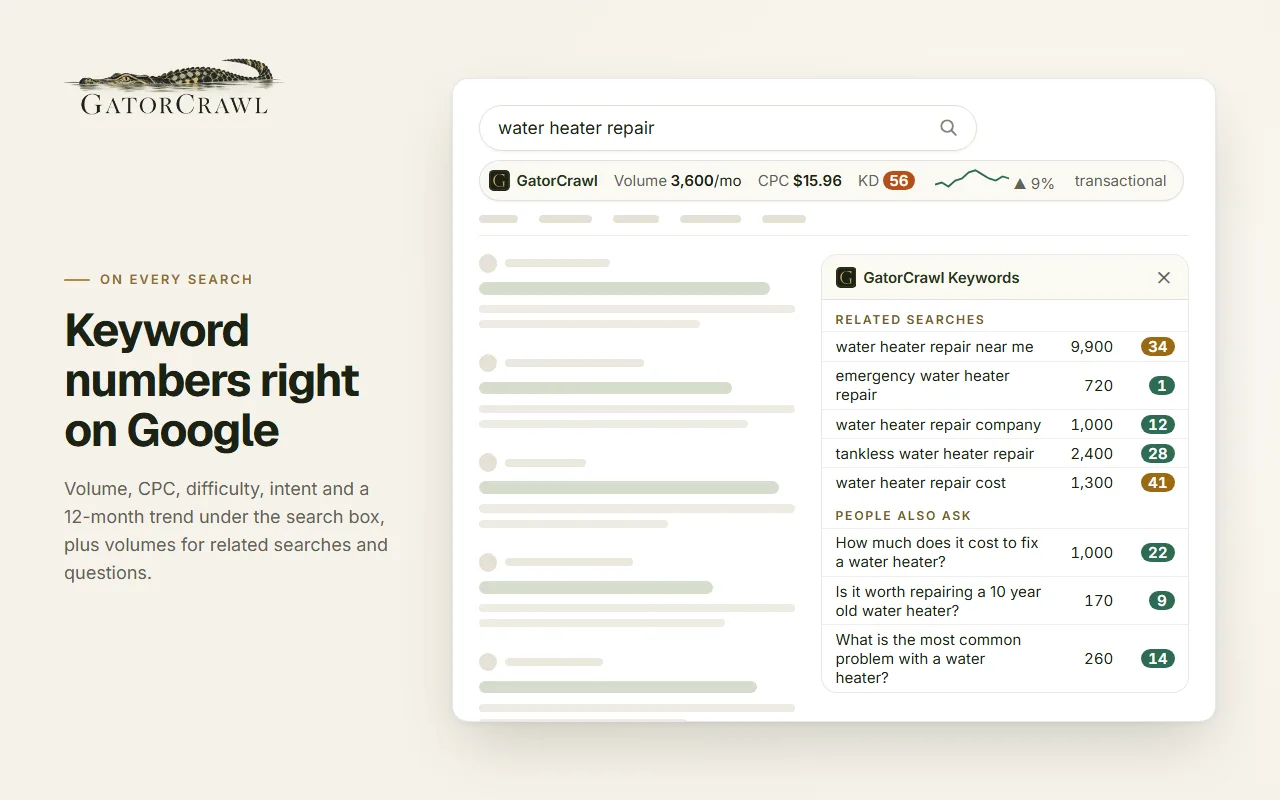
Two details matter more than they look. A comment in the code says "Everything renders inside a shadow root so Google's styles and ours never mix." Google can restyle its page without bending our bar, and our styles cannot leak into Google's. And Chrome's content scripts guide says these scripts run in an isolated world, "a private execution environment that isn't accessible to the page or other extensions." The page cannot read the extension's variables, and the script must message the service worker for anything beyond a few basic APIs.
The right-click lookup works differently. The site says to "Select any text on any page and right-click to look it up." The menu item, "Look up keyword volume," comes from the contextMenus permission, and a small lookup window shows results for a phrase of up to 10 words. No content script runs on those other pages, which is why the manifest needs no access to them.
The service worker: one token, one batch, one hour
The service worker, background.js, is the only part that talks to the server. In plain terms, it does five things:
- Holds the user's extension token, which it accepts from the web app's connect page "only from the configured app origin"
- Calls the GatorCrawl Keywords API once per Google results page, as a single batch, rather than once per keyword
- Keeps results for an hour in chrome.storage.session, so reloading a page does not spend credits again
- Adds the "Look up keyword volume" item to the right-click menu
- Opens the options page when someone clicks the toolbar icon
The cache follows from how Chrome treats service workers. Chrome's lifecycle guide says one is normally stopped "After 30 seconds of inactivity," and that global variables vanish when it shuts down, so values belong in storage. Chrome's storage reference adds: "If you're working with sensitive user data, instead use storage.session." A token and a page of recent results fit that description.
The file's header comment reads "No analytics, no tracking, no browsing history." That is a design decision rather than a slogan. An extension that sends the server only the words on a results page has little to disclose and little to lose.
Linking the account: the options page, credits and the trial
The options page connects the extension to a GatorCrawl Keywords account. It opens the web app's connect page, the user signs in there, and the app passes the token to the extension through Chrome's externally_connectable messaging. The page then shows "Connected as ... credits left" and lets the user choose a country. Chrome's options page guide notes users can also reach it by right-clicking the extension icon.
No billing lives in the extension. The site says lookups use the plan's credits and that "One credit is one keyword with data." As of November 2026, Starter is $19 a month with 20,000 keyword credits, Pro is $49 with 55,000, and Agency is $129 with 145,000, and every plan starts with a seven-day trial for $5. The extension is free to install and included with every plan. Change a price and the extension needs no update, because it only asks the server what the user has left.
That split, sign-in and billing in the app, a thin client in the browser, is the heart of a SaaS companion extension. How to charge for one is covered in monetizing a browser extension.
Two permissions requested, and the broad ones declined
What the extension requests
- storage, which shows no warning line in Chrome's permissions list
- contextMenus, which shows no warning line either
- Host access to keywords.gatorcrawlseo.com, the app's own address
- A content script on www.google.com/search and no other site
What it does without
- tabs, which Chrome warns about as "Read your browsing history."
- history, which carries the same warning
- The broad patterns Chrome's review page names, such as <all_urls>
- Optional host access in store builds, where the custom-address field is hidden
- Remotely hosted code of any kind
Chrome's permissions guide says permissions "help to limit damage if your extension is compromised by malware." A short list also spares reviewers: Google's review page says reviews may take longer for extensions that request broad host permissions. We cannot say ours went faster because of it, since we have nothing to compare it against.
The listing's privacy section, as read on November 16, 2026, declares that the extension handles personally identifiable information, authentication information and website content, and that the data is "Not being sold to third parties, outside of the approved use cases." The listing also says it "contains no ads and no tracking." More on what those declarations mean, and who checks them, is in our browser extension security guide.
The pattern, lifted out for your own extension
GatorCrawl is a keyword tool, but the pattern is general. Swap Google results for a prospect's website and the keyword API for your CRM, and the same parts become a CRM extension. Swap the bar for a side panel and the API for your AI provider, and it becomes an AI sidebar. Five habits carry over:
- Write the single purpose first, then refuse every permission it does not need.
- Keep the extension thin and the logic, keys and prices on your server.
- Batch requests and cache in session storage so users do not pay twice.
- Draw inside a shadow root when you draw on someone else's page.
- Let the web app own sign-in and billing, and let the extension ask.
Want the same pattern for your product? Custom Chrome extension development explains how we scope it, the pricing guide explains the cost, from $1,500 depending on complexity, and SEO extensions covers tools that draw data on search results. The API integrations behind an extension go live the same day.
Questions owners ask about custom browser extensions
Two: storage and contextMenus, neither of which shows a warning line in Chrome's permissions list. It also has host access to the GatorCrawl Keywords app's own address and a content script that runs only on Google search results pages. An optional host permission exists for custom app addresses, but that field is hidden in store builds.
The service worker's header comment says "No analytics, no tracking, no browsing history," and the store listing says it "doesn't record your browsing history." The extension sends the app only the query, related searches and questions from a Google results page, or a phrase you right-click, so it can return keyword data.
In GatorCrawl's case, the options page opens the web app's connect page, the user signs in there, and the app hands a token to the extension through Chrome's externally_connectable messaging. The service worker accepts that token only from the configured app origin and sends it with each API call. Billing and credits stay in the app.
So a reload does not spend the user's credits twice. Results sit in chrome.storage.session, which Chrome recommends for sensitive data. Storage also matters because Chrome normally stops an idle service worker after 30 seconds of inactivity, and anything held in a global variable is lost when that happens.
No. As of November 2026, the site says it is free to install and "Included with every plan," with lookups drawn from the plan's keyword credits. Plans list at $19, $49 and $129 a month, and each starts with a seven-day trial for $5, which the site describes as charged up front and non-refundable.
Not unchanged. MDN says Firefox does not support a Manifest V3 service worker background, so a cross-browser manifest declares both background scripts and a service worker. Safari needs the extension packaged inside an app with Apple's xcrun safari-web-extension-packager tool. Our cross-browser extensions page covers both.
Keep reading
- Your app, one tab closerSaaS Browser Extensions That Carry Your App's Login, Plan and Credits Into the Tab Your Users Already Have OpenA companion Chrome extension that signs in with your SaaS account, spends the same plan credits and bills on your own site. From $1,500, owned by you.
- Ask for lessChrome Extension Permissions Explained: The Warnings Users See, the Data Rules Behind Them, and a Privacy Policy That Matches the CodeWhich Chrome extension permissions trigger install warnings, how activeTab and optional permissions help, and the privacy disclosures Google requires.
- The offer, part by partCustom Chrome Extension Development Services: Discovery, a Permission Plan, the Build and a Listing in Your NameHire a Chrome extension developer for discovery, a written permission plan, a Manifest V3 build, store submission and a handover under your account.
- Your data, on their pageCustom SEO Chrome Extensions That Paint Your Own Numbers Onto Google's Results PageBuild an SEO extension that shows your own keyword, rank or client data on Google results, on one site, with two permissions. From $1,500, yours to own.
- Capture, minus the clipboardCRM Chrome Extensions That Save a Contact in One Click, Straight Through Your CRM's APIA Chrome extension that saves the contact on your screen to your CRM in one click, through the CRM's API, with no copy and paste. From $1,500.
- AI beside the pageAI Chrome Extensions That Summarize, Draft and Extract From the Side Panel, With Your API Keys Kept on Your ServerAn AI side panel that summarizes, drafts and extracts from the page you are on, using your own AI provider through your server. From $1,500, owned by you.
- Everything in Custom Browser ExtensionsSee the section
From the Insights desk
- The Websites That Have to Behave: Dental, Medical, Legal, and Med SpaIn most industries a dropped form is an inconvenience. In a dental office, a clinic, a med spa, or a law firm, that form carried something private. Most of them are built so nobody can say where it went.
- “We'll Fix It Later” Is the Most Expensive Sentence in Web DesignIt is said with the best intentions around week three of every website project. But later is not a time — it is a place where work goes to accumulate interest, and it always arrives on a Saturday.
Want this pattern for your own app?
Tell us what your web app does and where your users spend their day. We reply with a one-sentence purpose, a short permission list and a fixed written estimate from $1,500, or a note that the extension is not worth building.
Which of these sounds like you? (pick any)
Rather talk now? Call (210) 346-0848.