Own the Building: Why a Custom Next.js Site Beats WordPress and Webflow

Most business owners get handed the same two options, and both of them are rentals.
Door number one is WordPress. It is cheap on Tuesday and expensive on Friday, when the plugin that ran your contact form quietly updates itself into retirement. Door number two is a page builder — Webflow, Wix, Squarespace, Shopify. Tidier. Faster. Also a rental, in a building where the landlord can raise the rent, change the rules, and remodel the lobby while you sleep.
Both doors have the same sign hanging over them, if you bother to read it. You may decorate. You may not renovate.
There is a third door, and the industry is not eager to point at it, because it pays them less to mention it. You can own the building.
What "custom" actually means now
Custom used to mean slow, expensive, and fragile. A developer hand-rolled everything, billed for every hour of it, then moved to another state. That reputation is a decade out of date, and page builders have every reason to keep it alive.
A modern custom site is built on Next.js, the framework a great many of the web's fastest companies now run on. It sends pages to the browser already rendered, so a visitor sees your offer instead of a spinner. And it costs far less to build than custom did five years ago, because the framework already does the heavy work that used to be billed by the hour.
Complete customizability is not a slogan here. It is a structural fact. There is no theme to fight, no builder's opinion to route around, no plugin marketplace to pray to. If your business needs an instant estimate tool, a booking flow wired to your real calendar, a customer portal, a savings calculator, or a quoting engine that knows your actual margins, it gets built. Ask a page builder for those and you get a third-party embed, another monthly fee, and a shrug.
The CMS question, answered honestly
This is where the page-builder pitch usually wins, and it should not.
The argument goes like this: sure, custom is powerful, but then you will need a developer every time you want to change a headline. That was true once. It is not true now. Repeating it is simply how the lease keeps getting signed.
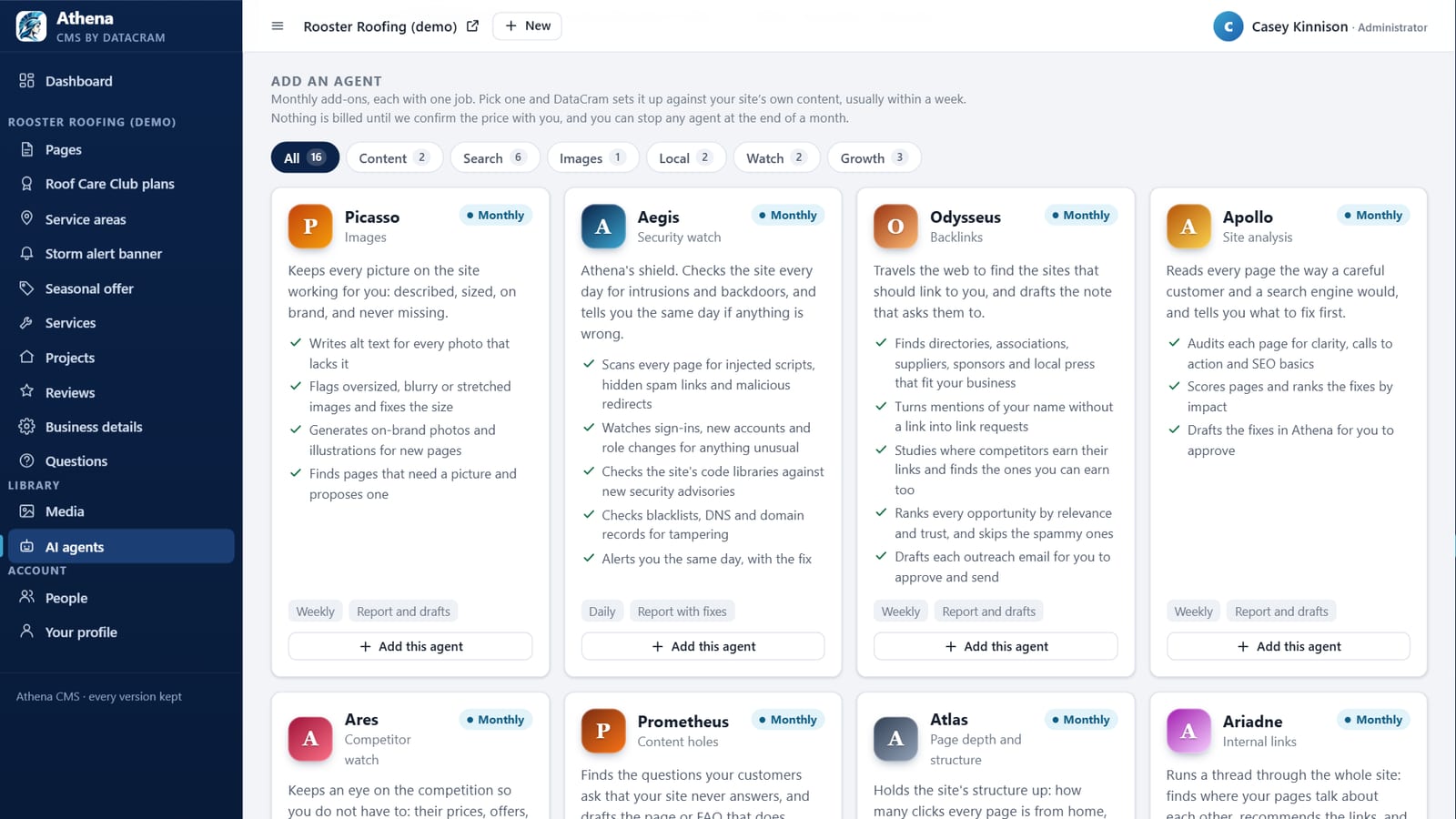
We build the content system as part of the site. Not a generic admin panel bolted on at the end — a CMS shaped to your business. Your services, your locations, your projects, your team, your posts, each with exactly the fields it needs and none of the fields it does not. Drafts and scheduling. Roles, so your office manager can post without being able to break the pricing page. Images optimized the moment they are uploaded. Search and social cards editable per entry, without a plugin.
Set that against the alternatives, plainly.
Against WordPress, there is no plugin sprawl, no Tuesday patch cycle, and no fifteen-plugin attack surface holding your homepage together. The content system cannot take down the front end, because it is not welded to it.
Against Webflow, the fields are modeled around your business instead of around the builder's data model. There are no CMS item caps, no per-seat editor pricing, and no rebuild when you outgrow a plan tier. Growth is not a billing event.
Here is the proof, and you are looking at it. This page — written, tagged, illustrated, scheduled, and published on a date we picked — runs on exactly that kind of system. No developer was involved on publishing day. That is the whole argument, demonstrated rather than promised.
Custom design versus a Webflow build
Webflow deserves more than a cheap shot, because it is genuinely the best of the builders. It is also still a builder, and the differences are not cosmetic.
There is no design ceiling. Webflow gives you a canvas and a rendering model, and everything you make lives inside the walls of that model. Ask for an interaction it does not support and the answer is a workaround, an embed, or a no. A custom build has no walls to work around, because there is no builder between the design and the browser. What gets designed is what gets built.
Your logic can live on the server. This is the big one, and it is where builder sites quietly stall. A Webflow site has nowhere to run your own server-side code, so the moment you need real logic — an estimate calculated from your live price book, a booking that checks true availability, a customer login, a payment tied to your own records — you are stitching together third-party middleware, paying monthly for each piece, and praying the chain holds. On a custom build that logic is simply part of the site, talking straight to your database.
Integrations connect directly. Your CRM, your field software, Stripe, your calendar. Direct API connections rather than a relay of connectors that each add a fee, a delay, and one more thing to break at 9 p.m.
Exporting is not the escape hatch people assume. Webflow will hand you static code. It will not hand you a working CMS. Anything you built on collections stops being editable the moment you leave, which is a strange definition of ownership for a site you paid for.
The bill grows with you. Site plan, then a higher tier for more CMS items, then a seat for each person who edits. The site gets more expensive precisely as it gets more successful. A custom build has hosting costs that are measured in dollars a month, and they do not care how well you are doing.
The page is lighter. Webflow ships its own runtime to every visitor whether the page needs it or not. A custom build sends the markup already rendered and only the code that page actually uses, which is the whole ballgame for Core Web Vitals.
None of this makes Webflow a bad tool. It makes it a rented one. If your site is a brochure, rent away. If your site has a job to do, the ceiling arrives sooner than the salesperson suggests.
Speed is not vanity. It is revenue.
A page builder ships the same generic payload to everyone, including the code for the twelve features your page does not use. A custom build ships what your page actually needs and nothing else.
That gap shows up where it counts: Core Web Vitals, which Google uses to rank you, and the first three seconds, where impatient buyers decide whether you are worth their time. Faster pages rank higher and lose fewer people on the way to the phone. It also means clean markup, complete structured data, and control over every tag on the page — which is the raw material SEO and AI search visibility are built from. On a hosted builder, you get whatever the platform decides to emit that quarter.
You own it. All of it.
The code, the content, the database, and the choice of where it lives. No platform can change your terms, sunset your plan, or price you into a migration you never budgeted for.
Ask the honest question of any platform: if we parted ways tomorrow, what would I walk out with? With a custom build, you walk out with everything, and any competent Next.js developer can pick it up on Monday. Most platforms fail that test, which is precisely why they never put it in the sales deck.
Where AI stops being a bolt-on
On a rented site, AI is a chat bubble in an iframe that has no idea who you are or what you charge.
On a build you own, AI agents and automations reach your real data. They answer the 9 p.m. inquiry, quote it against your actual pricing, check a real calendar, book the job, and send the follow-up — because they are inside the system instead of bolted to the outside of it. The site handles the pages. The agents handle the work. That is a difference in kind, not in degree.
What it costs, and what the alternative costs
A custom site starts at $1,750, which surprises people who have been told custom means five figures.
The page builder looks cheaper on day one. Then come the subscriptions, the apps, the plugin licenses, the premium theme, and the item you will not find on any invoice: your own hours. On a builder, you write every word. You do your own search work. You build every page. That labor is real, it is expensive, and nobody bills you for it in a way you can see. Run it out five years and the picture reverses — which is exactly what our cost comparison lays out, alongside a straight look at WordPress, Shopify, and Webflow. The pricing is published, not quoted after a discovery call designed to size up your wallet.
When a page builder is genuinely the right call
We will be straight with you, because the alternative is a client who regrets us in a year.
If you need five pages that will never change, a brochure for a business that runs entirely on referrals, or something live by Friday for an event next month, a template is fine and we will tell you so. Custom earns its keep when the site has a job — booking, quoting, selling, ranking, integrating — and when you intend to still be running it in five years.
The point was never to sell you the most expensive thing. It is to match the build to the job.
How DataCram helps
We design and build custom sites on a modern full-stack foundation, with a content system your team can actually run and the automations that turn a website into something that books work. If you are already on WordPress, there is a well-worn path off it that keeps your rankings intact, and a rescue route if the current site is actively on fire.
We are a San Antonio shop working with businesses here and clients across the country, and we measure the work in booked jobs rather than in how impressive the stack sounds. See what we have built.
FAQ
Is a custom Next.js site more expensive than Webflow or WordPress?
Higher on day one, lower by year two in most cases. There are no platform subscriptions, no plugin licenses, no per-seat CMS fees, and no hours of your own time spent doing the work a builder leaves to you. Builds start at $1,750.
Will I be able to edit the site myself?
Yes, and that is the point. You get a content system built around your business, with drafts, scheduling, roles, and image handling. If you can write an email, you can update your site.
Is your CMS really better than WordPress or Webflow?
For running a business site, yes. It has the fields your content actually needs instead of a generic post type, nothing to patch every week, no item limits or per-seat pricing, and no plugin that can take the site down. This article was published through it.
Can't I just export my Webflow site if I outgrow it?
You can export the code. You cannot export a working CMS — anything built on Webflow collections stops being editable once you leave, so an export gives you a frozen snapshot rather than a site you can run. It is worth knowing that before you build a business on it.
I already have a WordPress site. Do I lose my rankings?
No, not when the move is done properly. URLs are mapped, redirects are set, and structured data comes across with it. Handled right, sites typically come out faster and rank better, because speed and clean markup were the bottleneck.
What happens if we stop working together?
You keep the code, the content, the database, and the hosting account. Any competent Next.js developer can take it from there. We would rather earn the next project than hold your website hostage to get it.
Next steps
You do not have to choose between a cheap site that traps you and an expensive one that drains the account. Those were never the only two doors.
Tell DataCram what you do, or take the free audit, and we will tell you honestly what your current site is costing you — in speed, in rankings, in fees, and in the hours you spend doing work the site should be doing for you.

 What you edit with on Next.js