Page Two Is a Waiting Room: Finding the Keywords You Already Almost Own

There is a good chance your Search Console account holds a search phrase that Google already shows your site for, hundreds of times a month, in roughly fourteenth place. Almost nobody clicks it. Almost nobody on your staff knows it exists.
That phrase is the cheapest traffic you will ever buy. Google has already decided your page is relevant. It simply thinks a dozen other pages are a little more so. Closing that gap is often an afternoon of editing, not a quarter of content production.
SEO people call these striking distance keywords: searches where you rank just past the first page, in positions 11 to 20. Here is how to find them for free, judge which deserve a rewrite, change the page and tell whether it worked. Near the end we show where the keyword tool we built makes the job faster. The method works without it.
Position fourteen, and what the average hides
Start with the number itself, because it is easy to misread. Google's Performance report help page, read in November 2026, defines average position two ways. In the chart it is "the average position of the topmost result from your site." In the table it is "the average position in Search results for the specific URL or grouping dimension shown in the table row."
The word doing the work is average. A query at position 14.2 may have shown you in seventh place on Tuesday and twenty-second on Friday, to different people, in different towns, on different phones. Treat it as a zone, not an address. A query sitting between 11 and 20 for three months straight is telling you something steady: Google keeps putting you near the door and not inside it.
Two other cases look similar and are not. A page at position 40 has a relevance problem, which we covered in why trade pages rank on page three. A page at position 3 with few clicks has a listing problem, which is a click-through rate question. Striking distance sits between them, where an edit has the shortest distance to travel.
Pulling the list out of Search Console in fifteen minutes
You need a verified property with a few months of data. If you have never set one up, our Google Search Console guide walks through it. Then:
- Open Performance, then Search results, and set the date range to the last three months.
- Turn on Average position above the chart, alongside Clicks and Impressions.
- On the Queries tab, open the filter above the table and keep rows where Position is greater than 10.
- Sort by Impressions, highest first, and ignore anything past position 20 for now.
- Click each promising query, then the Pages tab, to see which page Google is ranking for it.
- Export the list to a spreadsheet so you can add your own columns.
Know two limits before you trust the export. Google's October 2022 deep dive on performance data says "the maximum you can export through the Search Console user interface is 1,000 rows of data." The same post says anonymized queries, ones "that aren't issued by more than a few dozen users over a two-to-three month period," are left out of query rows, and small local searches can land there. Your export is a floor, not a census.
Four questions that decide which keywords earn a rewrite
A raw export of a busy site can run to hundreds of rows. Most of them are not worth an hour. Run each candidate through four questions, in this order, and stop at the first no.
| Question | Why it matters | A no looks like |
|---|---|---|
| Would someone searching this phrase pay you? | Position is worthless on a phrase that never becomes a call | "what is a p-trap" on a plumber's site |
| Is it ranking the right page? | Two of your pages splitting one search both lose | A blog post ranks where the service page should |
| Is there room above you? | Some first pages are walled off by directories, maps and AI answers | Ten national directories and a map pack |
| Can you say something the top results do not? | Edits that add nothing rarely move anything | You would be copying page one in different words |
The second question is the one owners skip. When a blog post and a service page take turns ranking for the same phrase, the fix is often to merge, redirect or relink rather than to write more. That pattern has a name, keyword cannibalization, and it is worth ruling out before any rewrite.

Here is a worked example. The business and every number in it are invented for illustration: a plumbing company in San Antonio, three months of Search Console data.
| Query | Avg. position | Impressions | Clicks | Verdict |
|---|---|---|---|---|
| water heater replacement cost san antonio | 13.4 | 2,100 | 18 | Rewrite the replacement page first |
| tankless water heater install near me | 16.8 | 1,450 | 9 | Rewrite, after checking the map pack |
| water heater leaking from top | 12.1 | 980 | 14 | Ranks a blog post; decide which page owns it |
| how long do water heaters last | 11.6 | 3,300 | 41 | Skip for now; few of these searchers are buying today |
The biggest row by impressions is the one we would leave alone: that searcher wants a fact, not a plumber. The phrase with "cost" and a city in it rings phones, so it goes first.
What to change on a page sitting at fourteen
Start with the title, because it is the cheapest edit and the one searchers see. Google's title link documentation, read in November 2026, says title generation "is completely automated" and draws on the page's title element, its main heading and other signals, and asks for "descriptive and concise text." It also warns that repeating the same words makes a result look spammy. Write the title for the person typing the phrase: service, place, the thing they want to know. Our title tags guide has formulas by page type.
Then read the page as the searcher would. If the query says "cost" and the page never names a price range or explains what moves the price, that is the gap, and no amount of tidying fills it. Add the section the search is asking for. Answer it plainly near the top. Put a real photo of real work beside it. The basics are in our on-page SEO guide.
Then send the page some help from inside your own site. Google's link best practices say "Google uses links as a signal when determining the relevancy of pages," and that "every page you care about should have a link from at least one other page on your site." A service page that only the menu links to is a page you have told Google you do not care about. Add two or three links from related pages, with anchor text that describes the destination. A badly tangled site is a job of its own, and it is what our internal linking work is for.
Leave the address alone. Changing the URL of a page that already ranks puts at risk the history you are trying to build on.
Measuring the change without fooling yourself
Note the date of each edit; Search Console lets you add an annotation to the chart. Then wait. Google has to recrawl the page before anything can move, and a few days of data is mostly noise.
When you check, compare like with like: the same query, the same page, a 28-day window before the edit against a 28-day window after it, ideally the same weeks of the year if your trade is seasonal. Look at position and clicks together. Position up and clicks flat can mean the results page changed around you: an AI Overview arrived, or the ads grew. We explained why that report deserves suspicion in Search Console's AI report counts impressions, not clicks.
Change one thing per page per round, or you will never know which edit did the work.
Where GatorCrawl Keywords shortens the job
Full disclosure: DataCram built GatorCrawl Keywords, and we sell it. Everything above works with Search Console and a spreadsheet. The tool fills the columns Search Console cannot.
Search Console tells you where you stand. It does not tell you how many people search a phrase in total (impressions only count the times you appeared), how hard the phrase is, or who is standing above you and what else they rank for. That is where the tool comes in:
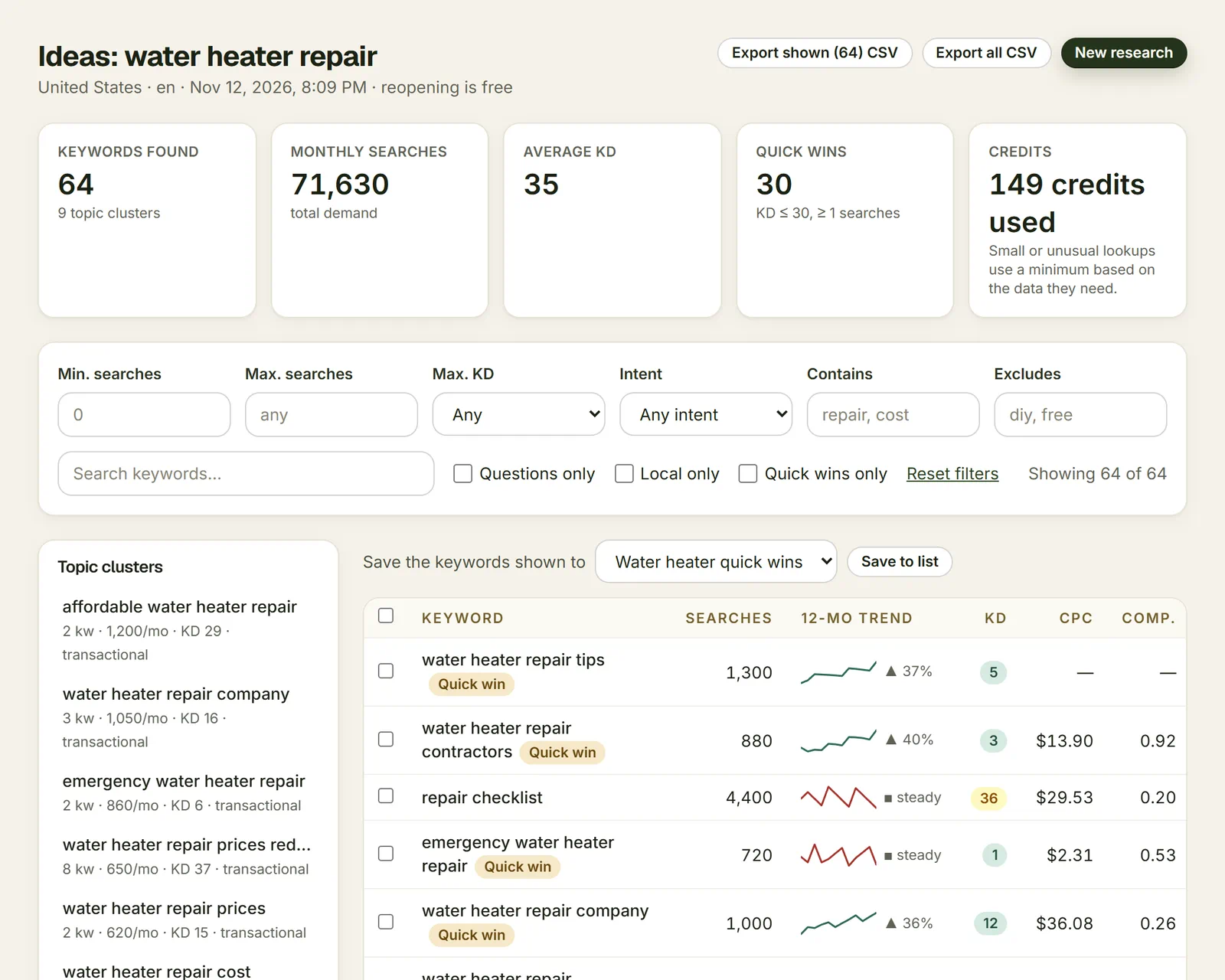
- Paste the list. Drop your striking distance export into the pasted-list mode, up to 1,000 keywords, and get monthly searches, a 12-month trend, difficulty, CPC and intent for each.
- Sort by one number. Every keyword gets a 0 to 100 opportunity score that weighs demand, difficulty and buyer intent. Use it to rank the work, not as a traffic forecast.
- Read the quick-win flag. GatorCrawl flags quick wins: easy keywords that still get searched. A phrase that is both flagged and already sitting at position 14 for you goes to the top of the list.
- Look at who is above you. The competitor lookup shows everything a rival domain ranks for, with positions, volumes and difficulty, and the keyword gap shows what they rank for that you do not.
- Check the page itself. The Chrome extension, included with every plan, shows volume, difficulty, CPC and trend under the Google search box while you study the results you are trying to join.
As of November 2026, plans are $19, $49 or $129 a month. A seven-day trial costs $5 for 5,000 keyword credits; the $5 is non-refundable, and the plan you picked starts after the week unless you cancel first. Start the GatorCrawl Keywords trial if your list is long enough that the spreadsheet is slowing you down. If it is twelve rows, you do not need it. Our roundups of keyword research tools and competitor analysis tools compare it with the free options and the big suites.
When the list is longer than your afternoons
If you have a dozen striking distance phrases and a free Saturday, do it yourself. Pick three, rewrite them in order, measure, repeat.
If the list runs to hundreds of rows across dozens of pages, or the right page for a search does not exist yet, that is when a second pair of hands pays. Our SEO programs start at $575 a month with no long contract, as listed on our SEO pricing page, and the first month usually starts right here, on the phrases Google has already offered you. If you only want the research done once, that is our keyword research service. If you are not sure the site itself is healthy enough to rank, begin with the free site audit.
Want us to look at your own export? Send it to us, or call (210) 346-0848. We are a web studio in San Antonio, Texas, building for the web since 1999, and we will tell you which rows are worth the work and which ones only look like they are. For the bigger plan around this, see how to build an SEO strategy for 2027.
Frequently asked questions
What are striking distance keywords?
They are searches where your site already appears just past the first page of Google, usually positions 11 to 20 in Search Console. Google has judged your page relevant but not the best answer. Because the hard part, relevance, is already done, a better title, a missing section or a few internal links can often move the page up more cheaply than building a new page for a fresh keyword.
Why do positions 11 to 20 matter more than position 40?
A page at 40 usually has a relevance problem: Google barely connects it to the search, and the fix is often a new or rebuilt page. A page in the teens is close. The search is already matched, and the gap to the first page is about quality, completeness and links. That makes it the shortest route from a page you have to traffic you can measure.
How do I find striking distance keywords for free?
Open Google Search Console, go to Performance, choose the last three months and turn on Average position. On the Queries tab, filter the table to Position greater than 10, sort by impressions and keep the rows up to position 20. Click each query and check the Pages tab to see which page ranks, then export the list to a spreadsheet.
Should I change the URL of a page I am improving?
No. A page that already ranks in the teens has history with Google, and a new address starts that history over unless every redirect is perfect. Improve the title, the content and the internal links on the existing URL. Change the address only when the page is being merged into another one, and then redirect the old address permanently.
How long should I wait before judging a rewrite?
Long enough for Google to recrawl the page and for a full comparison window to pass. We note the edit date, then compare four weeks after the change with the four weeks before it, on the same query and page. Seasonal trades should compare with the same weeks last year. A few days of data mostly measures noise, and nobody can promise a particular movement.
Do I need a paid keyword tool for this?
Not to start. Search Console finds the phrases and a spreadsheet sorts them. A paid tool helps when the list gets long, because it adds total search volume, difficulty and the competitors above you. We built GatorCrawl Keywords for that job; as of November 2026 plans start at $19 a month.


 SEO that keeps working