Why Your Business Isn't Showing in Google's Map Pack (And How to Fix It)
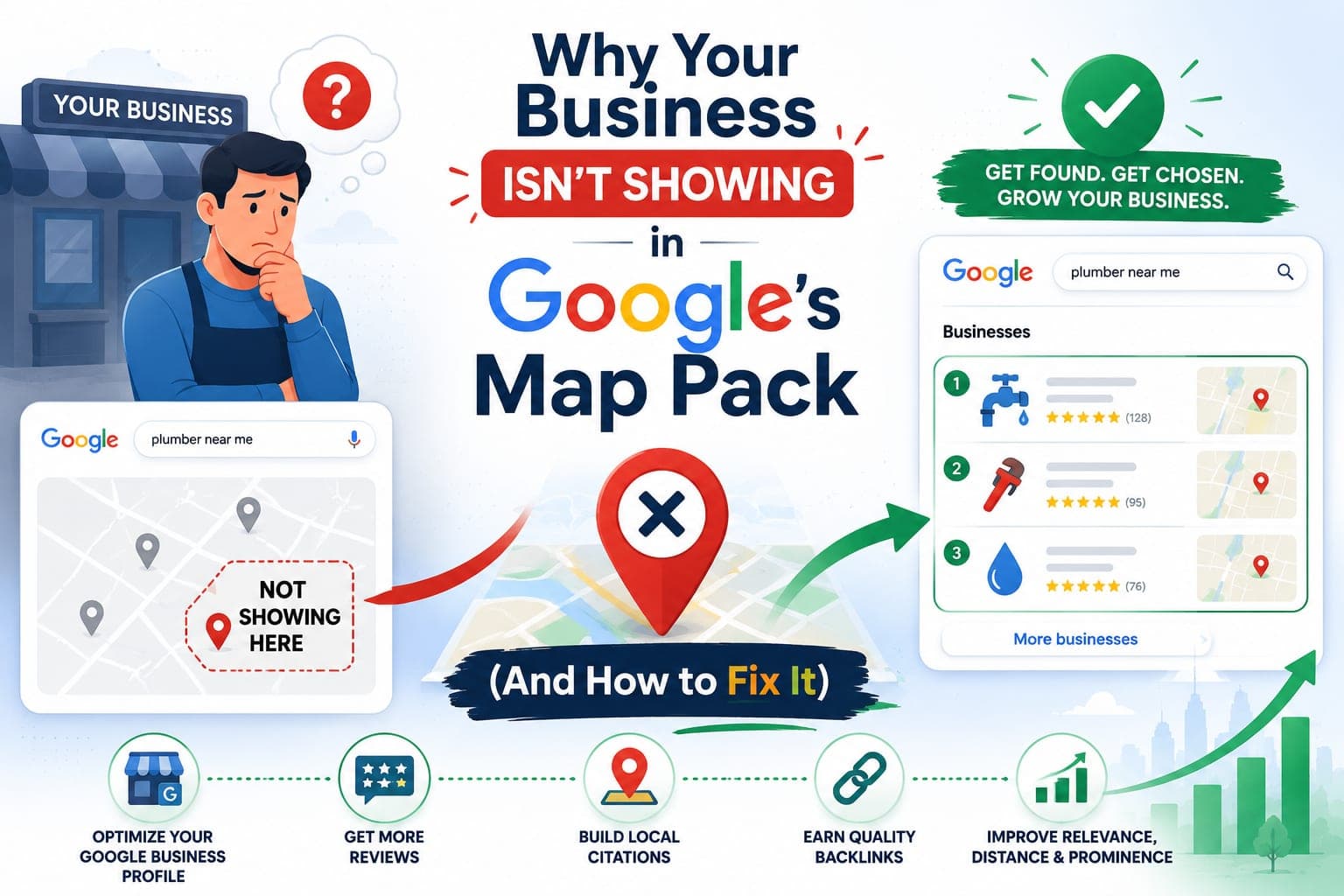
Three businesses win the local search. Everyone else scrolls.
When someone near you types "plumber near me," "best tacos," or "emergency dentist," Google answers with a map and three listings stacked on top of it. That box is the Map Pack. It sits above the ordinary blue links, and it takes the lion's share of the clicks for searches made by people who are ready to call, book, or drive over. If your business is not one of those three, you are invisible for the exact moment a customer is trying to hand you money.
Here is the part most owners miss: the Map Pack is not luck. It runs on signals you can measure and change. Below are the real reasons you are not showing, ordered by how often each one is the actual culprit — and the specific fix for each.
First, what the Map Pack ranks on
Google has said plainly that local results are ranked on three things: relevance, distance, and prominence. Relevance is how well your business matches the search. Distance is how close you are to the searcher. Prominence is how well-known and trusted you are, online and off.
Every problem in this article is really one of those three levers stuck in the wrong position. Fix the lever, move the ranking. Keep that frame and the rest is just execution.
Reason 1: Your profile is unclaimed, unverified, or half-empty
The Map Pack is built from Google Business Profiles, not from websites. No profile, no entry. A profile you have never claimed, or one you claimed and left thin, is a profile Google cannot trust enough to rank.
This is the most common reason a business is missing, and the easiest to fix.
The fix. Claim your profile at google.com/business and finish verification — Google will not rank an unverified listing. Then fill every field, not the easy ones. Business name exactly as it appears on your sign. Hours, including holidays. A real local phone number. Services and products with descriptions. A booking or website link. A complete profile tells Google you are a real, active business. A skeleton tells it you might be gone.
Reason 2: Your primary category is wrong — or missing
Category is the single strongest relevance signal you get to set yourself. A roofer listed under "Construction Company" is competing in the wrong race. Get the category wrong and no amount of reviews will save you.
The fix. Set the most specific primary category that describes what you do — "Emergency Plumber," not "Plumber," if that is the search you want. Then add secondary categories for your other services. Look at the businesses already winning your search; their categories are public, and they are a map of what Google expects.
Reason 3: Your name, address, and phone don't match across the web
Google cross-checks the name, address, and phone number on your profile — your NAP — against the hundreds of other places they appear: Yelp, Apple Maps, Facebook, the BBB, industry directories, old listings you forgot about. When those copies disagree, Google trusts you less. A suite number here, an old phone there, "Ave" in one place and "Avenue" in another — each mismatch chips away at prominence.
The fix. Decide on one canonical version of your NAP, down to the punctuation. Correct it first on the profiles that carry the most weight — the data aggregators, Apple, Yelp, Facebook, your own website footer — then work down the list. Hunt for duplicate and outdated listings and kill or correct them. Consistency is boring. It also works.
Reason 4: You don't have enough reviews — or you ignore the ones you have
Reviews are prominence you can earn on purpose. Google weighs how many you have, how recently they arrived, your average rating, and whether you reply. A business with 150 reviews and a steady trickle of new ones outranks a better business sitting on 12 from two years ago.
The fix. Ask every customer, every time, while the job is still fresh. Make it one tap — a short link or a QR code, not a treasure hunt. Reply to all of them, the good and the bad; a calm, specific response to a one-star review earns more trust than the five-stars do. Never buy fake reviews. Google is good at spotting them, and the penalty is worse than the silence.
Reason 5: Your website sends weak local signals
Prominence also comes from your site. Google reads it to decide how real and how relevant you are. A one-page site with no mention of the places you serve, no structured data, and a slow phone experience gives it almost nothing to work with.
The fix. Build dedicated pages for your core services and the areas you cover — a real page for each, with genuine detail, not a list of town names. Add LocalBusiness and Service schema in JSON-LD so search engines can read your name, address, hours, and offerings as facts instead of guessing. Embed your Google map. Make the pages fast on a phone, because that is where local searches happen. These are the signals that connect your website to your listing.
Reason 6: You're simply outside the search radius
Distance is the one lever you cannot fully move. When two businesses are equally relevant and equally prominent, the closer one usually wins. If your shop is across town from the searcher, you may be losing on geography alone.
The fix. You cannot relocate, but you can widen your effective radius. Set accurate service areas if you go to the customer. Build enough prominence — reviews, citations, on-page signals — that Google is willing to show you farther out. Publish content aimed at the neighborhoods you want, so relevance climbs where distance works against you. Prominence is how strong businesses reach past their own zip code.
Reason 7: A duplicate or suspended listing is splitting your signals
Sometimes the profile is not missing — it is fighting itself. Duplicate listings split your reviews and confuse Google about which one is real. And a profile can be suspended outright for policy violations: a keyword-stuffed business name ("Joe's Plumbing San Antonio Best 24 Hour"), a fake address, a virtual office presented as a storefront.
The fix. Search your business name and phone number and find every listing that appears. Merge or remove the duplicates. If your profile is suspended, fix the violation and file for reinstatement — starting with the business name, which must match your real-world signage, not the search you wish you ranked for. One clean, compliant profile beats three messy ones.
A 7-day plan to get back in the running
You do not need a quarter. You need a week of focused work.
- Day 1: Claim and verify the profile. Set the primary and secondary categories.
- Day 2: Fill every field — hours, services, phone, description, booking link.
- Day 3: Audit your NAP and fix it on the top citation sources.
- Day 4: Add LocalBusiness and Service schema, and publish one real service-area page.
- Day 5: Stand up a review request system and send the first batch.
- Day 6: Add real photos and publish your first Google post.
- Day 7: Find and clear duplicates, and report any competitors gaming their names.
Then leave it alone and let the signals settle.
How to know it's working
Do not judge this by refreshing your own phone. Your results are personalized by your location and history, so they lie to you.
Track the things that don't: your Map Pack position for your key searches across a grid of locations, not just from your desk. The calls, direction requests, and website clicks in your Business Profile performance report. Your review count and rating over time. Traffic to your new local pages. And the number that actually pays the bills — booked jobs. Give real changes 30 to 90 days to show up. Local ranking moves slowly, then all at once.
Why this matters
Local searches convert like almost nothing else online. Someone searching "near me" is not browsing — they are close, they are deciding, and they will usually pick from what Google puts in front of them first. The Map Pack is that first thing. A spot in it is the difference between a phone that rings and one that doesn't, and it compounds: more calls bring more reviews, more reviews bring more prominence, more prominence brings more calls. Getting in is the hard part. Staying is easier.
How DataCram helps
DataCram builds local visibility as a system, not a one-time cleanup. We fix and optimize your Google Business Profile, straighten out your citations, wire LocalBusiness and Service schema into a fast site, and stand up service-area pages that earn the prominence the Map Pack rewards. Our Digital Yard Sign SEO platform turns finished jobs into ranking local pages on autopilot. Everything is tied to numbers you can see — rankings, calls, and booked work — so you know what the work is buying. We serve businesses from San Antonio to the coast and clients nationwide.
FAQ
Q: How long until I show up in the Map Pack?
A: A newly verified, well-built profile can appear within a few weeks for less competitive searches. Competitive markets take longer — often 60 to 90 days of consistent reviews, citations, and on-page work. There is no switch; it is accumulation.
Q: Do I need a physical address to rank?
A: You need a valid address to verify, but service-area businesses can hide it and still rank by defining the areas they cover. What you cannot do is invent an address or use a virtual office — that risks suspension.
Q: If the Map Pack runs on profiles, does my website even matter?
A: Yes. Google reads your site to judge relevance and prominence, and your local pages, schema, and speed feed directly into where you land. The profile gets you into the game; the website helps you win it.
Q: Can I pay Google to be in the Map Pack?
A: No. The three organic listings cannot be bought. Google's Local Services Ads and Search ads are separate paid placements that sit above or around the Pack — useful, but not the same thing, and gone the moment you stop paying.
Next steps
Pull up your own key search right now and see whether you are one of the three. If you are not, you know why by this point, and you know the fixes. Work the list, or tell DataCram what you sell and where — we will tell you, straight, exactly what stands between you and the top of the map.

 SEO that keeps working